 Search Tips
RFQ Evaluation Criteria
When requesting quotes from vendors, you may need to score and rank each vendor according to certain criteria before proceeding with a particular quote. This section in IPM lets you store the criteria you need to score vendors on for RFQs. Once they have been created here, you can add the appropriate criteria to each job in IPM.
To Add a New RFQ Criteria
- In the drop down navigation menu, click on IPM Reference Data > RFQ Evaluation Criteria
- Click on New to bring up the New RFQ Criteria screen
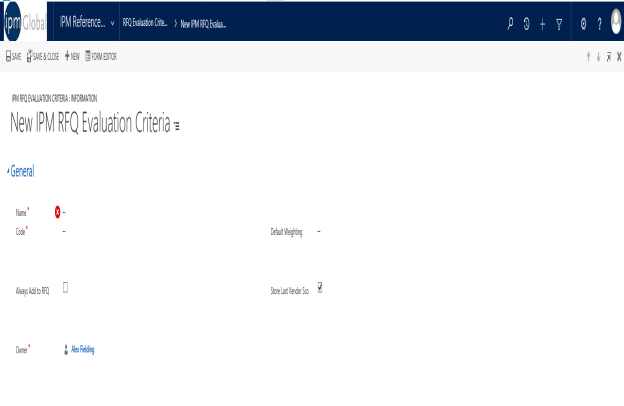
- Enter the Name of the criteria you wish to add
- Enter a unique Code
- If necessary, enter a Default Weighting
- Criteria will only appear on RFQs if they are added to the job that the RFQ is created for. However if you wish for this particular criterion to appear on all RFQs, regardless of whether it is added to the Job or not, check the Always Add to RFQ box
- Scores for Vendors from previous RFQ criteria can also be automatically brought over to the criteria for the next RFQ by checking the Store Last Vendor Scores Regarding This Criteria box
- Once you have finished adding all the necessary information, click Save and Close or Save and New if you wish to add more criteria